A Wolfbox Dash Cam is not a single product but a family of mirror-style and windshield-mounted recorders, and that distinction is the first thing most buyers miss. NHTSA’s rear visibility rule made backup cameras standard equipment on new U.S. vehicles from May 2018, yet those cameras record nothing — they help you park, not prove what happened.
Table of Contents
- What Makes a Wolfbox Dash Cam Different From a Basic Recorder
- Mirror-Style or Windshield Mount: Picking the Right Wolfbox Dash Cam
- Installing Your Unit: Setup Steps That Prevent Costly Mistakes
- Storage, Heat, and Parking Mode: Keeping the Recorder Alive
- Turning Footage Into Evidence: The Workflow That Wins Claims
- Is a Wolfbox Dash Cam legal to mount on my windshield in every state?
- Can a Wolfbox Dash Cam run parking mode without draining my battery?
- Can I move a Wolfbox Dash Cam between cars?
- Why does my Wolfbox Dash Cam stop recording unexpectedly?
- How does a Wolfbox Dash Cam compare with a phone-based dash cam app?
- Conclusion
That gap is why drivers keep shopping for a device that captures both directions.
The problem is that product pages blur together. One lists 4K, another lists dual-channel, and neither tells you whether the unit survives a hot dashboard or an eight-hour parking shift. This guide covers the five decisions that separate a setup you forget about from one that saves you at the claims desk.
You will see how the hardware differs, how to install it cleanly, and how to keep it recording for years.
What Makes a Wolfbox Dash Cam Different From a Basic Recorder
A Wolfbox Dash Cam earns its price in details most spec sheets bury: sensor quality, heat tolerance, and how the rear channel is wired.
The headline number is resolution, and it is worth understanding. A 4K frame is 3840 × 2160 pixels, roughly 8.3 million of them — about four times the 2.1 million pixels in a 1080p frame. That extra detail is what lets you read a plate two car lengths ahead instead of guessing at a blur.
Heat is the second difference. Many budget units use lithium-ion batteries that swell and fail in a sun-baked cabin. Mirror-style models typically use supercapacitors, which tolerate temperature swings far better and are the reason these units last through multiple summers.
The third difference is the rear lens. The Insurance Institute for Highway Safety notes that rear-end crashes are among the most common collision types on U.S. roads, and that is exactly the scenario a rear-facing camera documents. A front-only recorder leaves that half of the story untold.
How to apply this: Open the spec sheet for any model you are considering and confirm three things — 4K front resolution, supercapacitor power, and an included rear camera.
Mirror-Style or Windshield Mount: Picking the Right Wolfbox Dash Cam
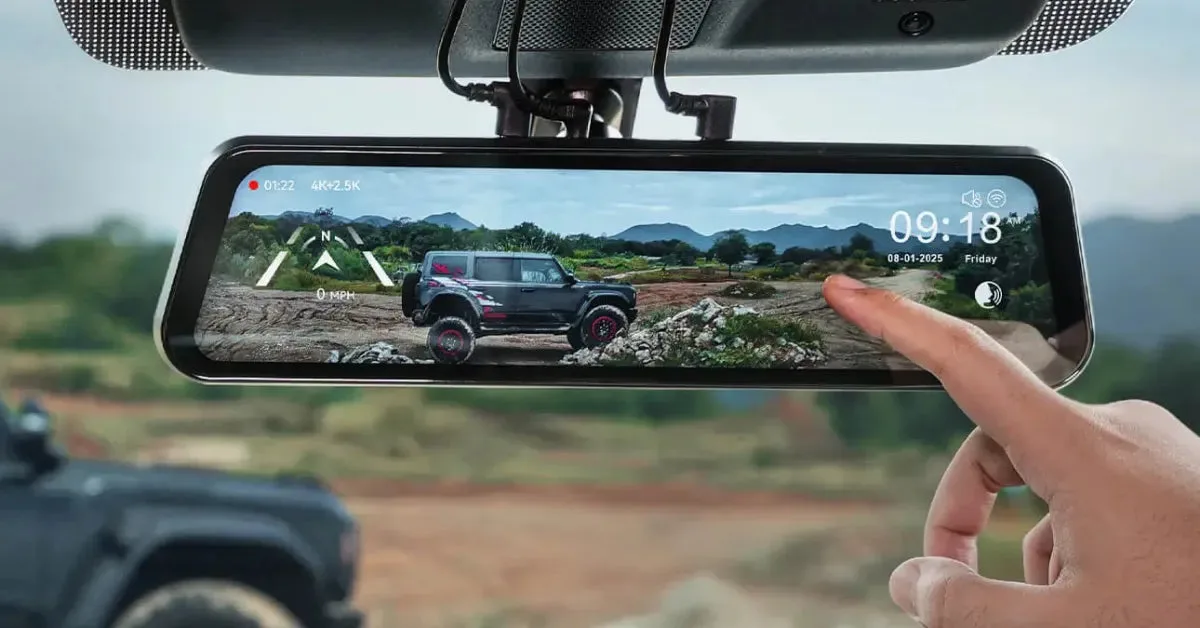
Mirror-style units replace your rearview mirror with a screen that shows the rear feed continuously. They suit trucks, vans, and SUVs where a full load blocks the factory mirror. Standard windshield units are smaller, easier to move between cars, and less likely to fight with factory mirror sensors.
Screen size matters less than most shoppers assume. What matters is whether the rear feed displays all the time or only in reverse — a continuous feed turns a mirror into a live rear window.
Consider a driver who tows a trailer: a mirror-style body hides the bracket entirely and the rear lens mounts on the trailer’s back edge, so the trailer stops being a blind spot. That is a workflow change, not a spec bump.
| What to check | Why it matters | Action to take |
|---|---|---|
| Front resolution | 4K reads plates at distance; 1080p is cheaper | Match to how often you drive at night |
| Rear channel | Documents rear-end hits | Confirm the kit includes a rear camera |
| Power source | Supercapacitor handles heat better than lithium | Parking in sun? Choose supercapacitor |
| Storage | Loop recording overwrites oldest clips | Buy a high-endurance card |
| Parking mode | Needs a hardwire kit or OBD cable | Decide before you install |
| App pairing | Faster clip sharing with insurers | Test Wi-Fi pairing on day one |
Wolfbox publishes model-by-model spec sheets, which is the fastest way to compare brackets before you buy.
How to apply this: Measure your mirror arm and note whether your car has a sensor housing behind the mirror — that single measurement rules out half the lineup immediately.
Mirror-style units replace the rearview mirror with a live rear-feed screen, making a Wolfbox Dash Cam ideal for trucks, vans, and SUVs where cargo blocks the factory mirror.
Visit the Wolfbox Official Website →
Installing Your Unit: Setup Steps That Prevent Costly Mistakes
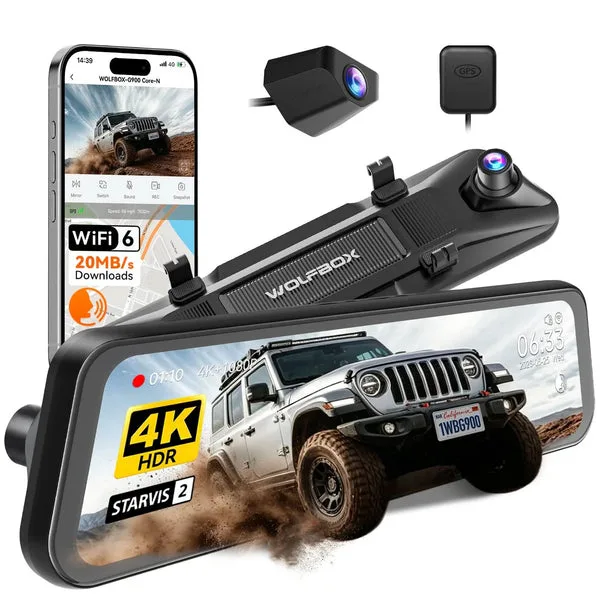
Clean installation is mostly about three choices: mount position, cable route, and power source.
Mount the front unit below the AS-1 line marked on the glass and out of the wiper’s sweep pattern. Several states restrict how much of the windshield an object may obstruct, so check your DMV handbook before you commit to a suction cup near the driver’s sight line.
Route the rear cable along the headliner and down the passenger-side pillar, tucking it behind trim rather than across airbags. Never run a cable across a side-curtain airbag — that is a genuine safety failure, not a cosmetic one.
For power, the 12V socket is the safe default. A hardwire kit with a fuse tap unlocks parking mode but adds an hour of work and a small risk of battery drain if the cutoff is set wrong.
Once mounted, format the card inside the unit rather than on a computer, then set the G-sensor to medium. High sensitivity fills the card with locked “event” clips that never overwrite, which quietly kills loop recording.
How to apply this: After your first drive, pull the card and watch two minutes of footage — if you cannot read a plate at 20 feet, adjust the angle before you finish the install.
A clean install comes down to mount position, cable route, and power source, so position your Wolfbox Dash Cam below the AS-1 line and clear of the wiper sweep.
Storage, Heat, and Parking Mode: Keeping the Recorder Alive
Most “my camera died” reports trace back to the memory card, not the camera.

Loop recording writes constantly, and standard cards built for photos are not rated for that workload. Buy a high-endurance microSD card from a brand that publishes endurance ratings, such as SanDisk‘s High Endurance line, and treat it as a consumable — reformat it monthly and replace it yearly.
Parking mode is the second common failure point. A Wolfbox Dash Cam in parking mode draws standby current, and without a voltage cutoff it will happily flatten a healthy battery overnight. Set the cutoff at the highest available threshold if you park outdoors in cold weather, where battery capacity drops.
Heat compounds both problems. A windshield-mounted unit in direct Arizona or Texas sun can exceed the operating range of consumer electronics, which is another argument for supercapacitor power and for parking in shade when you can.
Finally, check the record indicator every time you start the car. A blinking light takes one second to confirm and prevents the worst outcome: discovering a dead card after the crash.
How to apply this: Buy two high-endurance cards, keep one formatted in the glovebox, and swap them on the first of every month.
Turning Footage Into Evidence: The Workflow That Wins Claims
Footage only helps if you can find and export it within the insurer’s window.
Start by syncing the clock. Most units pull time from GPS or your phone, but a manual set is worth confirming — a timestamp that is off by an hour invites questions about authenticity.
Next, learn the export path before you need it. The companion app lets you download a clip to your phone over Wi-Fi, which is faster than pulling the card and hunting for a file reader at the roadside.
When an incident happens, stop recording deliberately rather than yanking the power. Most units buffer the current file on shutdown; a hard unplug can corrupt the last segment — the exact segment you need.
Store a copy in cloud storage the same day. A Wolfbox Dash Cam clip that lives only on a card in a hot car is one failure away from gone.
How to apply this: Record a 30-second test clip today, export it to your phone, and email it to yourself — that rehearsal is the whole workflow in miniature.
Visit the Wolfbox Official Website →
Frequently Asked Questions About Wolfbox Dash Cam
Is a Wolfbox Dash Cam legal to mount on my windshield in every state?
Most U.S. states allow dash cams, but several restrict how much of the windshield an object may obstruct, and a few limit mounts near the driver’s sight line. Mirror-style units sidestep the question because they replace the existing mirror rather than adding a second object.
Check your state DMV handbook and any lease agreement before mounting a Wolfbox Dash Cam, and keep the device below the AS-1 marking on the glass.
Can a Wolfbox Dash Cam run parking mode without draining my battery?
Only with a hardwire kit that includes a voltage cutoff. Standby current is small, but a cutoff setting stops recording before the battery drops below starting voltage. If you leave the car at an airport for a week, expect the unit to shut down early unless you add a dedicated battery pack. Short daily commutes are rarely a problem.
Parking mode works safely with a hardwire kit and voltage cutoff, letting your Wolfbox Dash Cam stop recording before the battery falls below starting voltage.
Can I move a Wolfbox Dash Cam between cars?
Yes, if you keep the original mounts and cables. Windshield units transfer in minutes; mirror-style units are vehicle-specific because the bracket must match your mirror arm.
Moving a Wolfbox Dash Cam into a rental is realistic with an adhesive mount and a 12V plug — just skip the hardwire kit for a short trip and remove it before you return the car.
Why does my Wolfbox Dash Cam stop recording unexpectedly?
The memory card is the usual culprit. Loop recording writes constantly, and a card at the end of its write-cycle life silently stops accepting new files. Reformat in the unit every few weeks, replace the card annually, and confirm the record light blinks after every start. If a Wolfbox Dash Cam still fails, inspect the fuse tap connection next.
How does a Wolfbox Dash Cam compare with a phone-based dash cam app?
A phone app can record, but it overheats, drains battery, and occupies the screen you need for navigation. Dedicated hardware wins because it starts with the ignition and overwrites old files without input. The trade-off is install time.
For occasional scenic clips a phone is fine; if you want a Wolfbox Dash Cam running every time you turn the key, purpose-built hardware is the safer choice.
Conclusion
The right setup comes down to a few repeatable decisions:
– Match the form factor to your vehicle — mirror-style for trucks and vans, windshield units for cars you swap between.
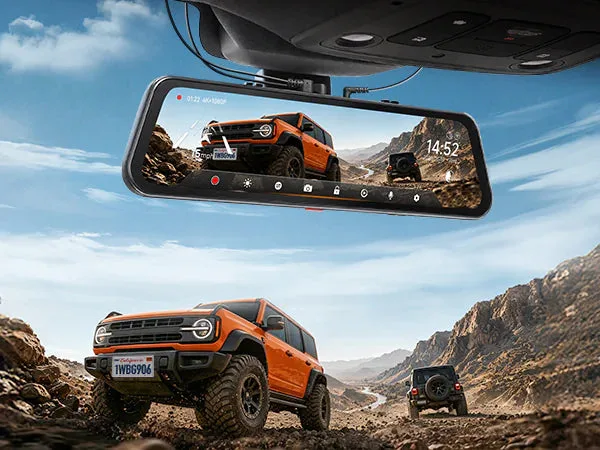
– Confirm 4K front resolution, a supercapacitor, and an included rear camera before you buy.
– Treat the memory card as a consumable and reformat it monthly.
– Rehearse the export workflow once, calmly, so it is automatic when it counts.
A Wolfbox Dash Cam rewards planning more than spending. The hardware is only half the system; the mount position, the card, and the cutoff setting do the rest. Start with the spec-sheet check above, then record and export one test clip this week — that single rehearsal tells you more than any review.
Visit the Wolfbox Official Website →